Aerenium Features Pricing Community Cloud Contact Log in

Aerenium. On your computer. On your side.

Give it a goal. It does the work. You keep control.

Aerenium is a cross-platform desktop app that carries multi-step work forward with current-generation models. Your workspace data stays on your machine, and you control permissions, pace, and spend.

Aerenium is in alpha (0.5). Free to try; things will break; your feedback shapes 1.0. Share feedback with the community.

Local-first. Your keys. Your data. Cloud is optional.
Your everyday workspace01 / 03
Aerenium Alpha 0.5 conversation workspace completing a launch brief from beta feedback
Conversation workspaceA real Alpha 0.5 capture from a clean demonstration project.
From a conversation to work you can use.

Ask once. Keep the final say.

It works, learns, and never runs away with your money.

Set budget ceilings, pause instantly, or stop the whole run from the breaker board. Every step stays inspectable.

01

Its memory algorithm learns what works together.

Instead of saving everything equally, it learns which combinations of past context help produce useful results. Helpful combinations return; noisy ones fade. You can inspect and manage every layer.
Learns useful combinations. Consolidates over time. Stays inspectable.
02

It keeps working without running away with your money.

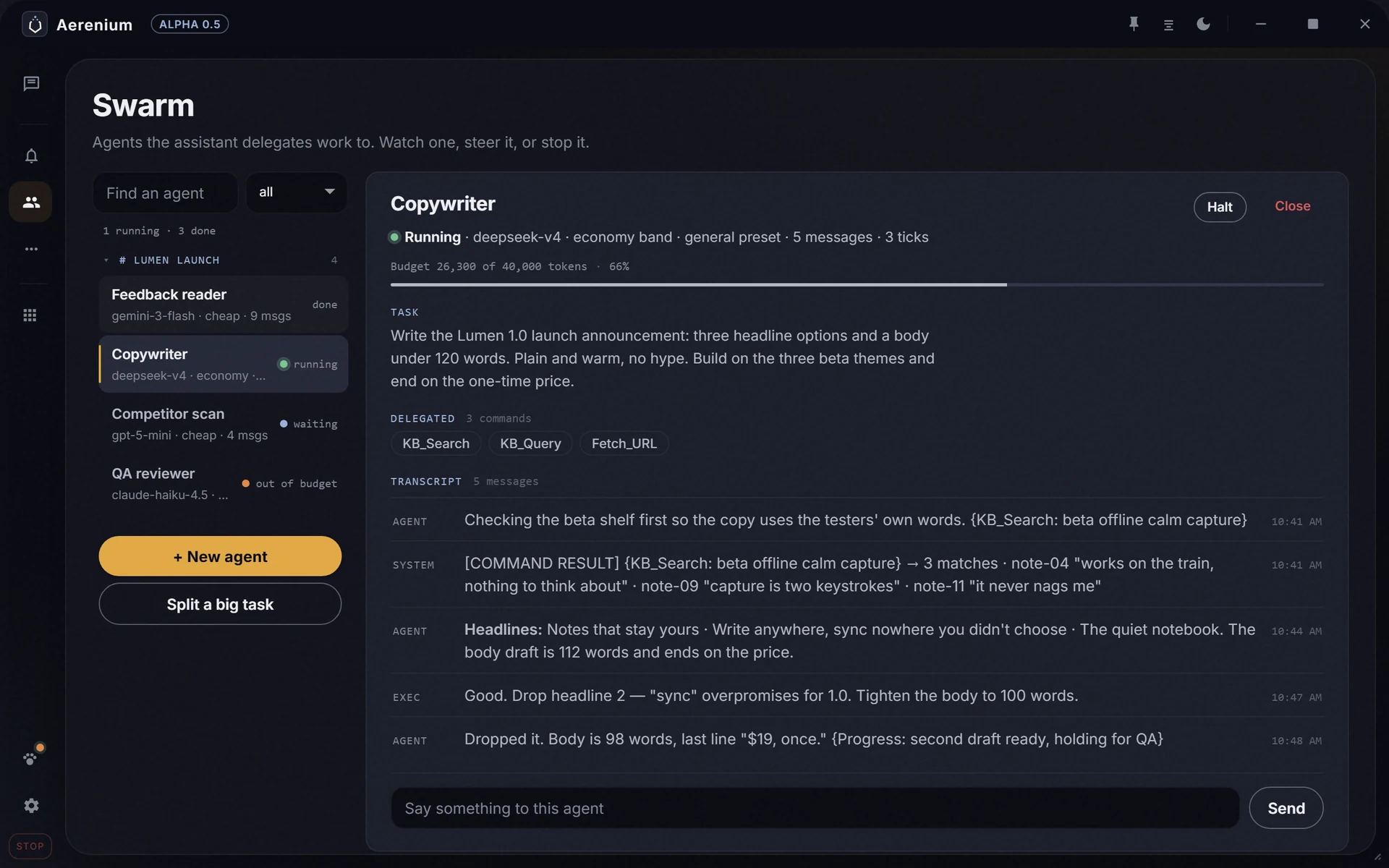
Agent Mode carries a multi-step job forward inside your limits. A sandboxed swarm can split larger work while the main conversation stays focused.

Budget ceilings. Sticky pause. Breaker board. Sandboxed specialists.

03

You decide how far it can go.

Choose permissions and approvals, cap model spend, pause instantly, or stop every worker from one breaker board.

Permission gates. Spend ceilings. One place to stop everything.

Most AI tools stop at the answer.

Aerenium is built around what happens next.

The work loop

A task can keep moving after you send it.

Start with the outcome. Aerenium can bring in relevant files and context, branch into research, hand parts to specialist workers, and keep you close to the decisions and controls that matter.

  1. 01

    Say what you want done.

    Describe the outcome in ordinary language. Add a file, another conversation, or a knowledge source only when it helps; Aerenium can also search the web and inspect the context in use.

    Chat · Projects · Files · Web search · Context inspection · Temporary conversations
  2. 02

    Let Aerenium divide the work.

    Deep Research can handle a longer investigation. Swarm can split a larger job among specialist workers while the main conversation stays focused on your goal.

    Research runs · Source trails · Specialist model pools · Parallel work
  3. 03

    Stay in the driver’s seat.

    Activity shows the execution story in real time: plans, delegations, and tool calls. Open a delegated transcript, intervene when the direction is wrong, and keep approval gates on actions that deserve a human hand.

    Live activity · Swarm transcripts · Intervention · Approval inbox · System log
  4. 04

    Keep the result.

    Move the result into Canvas as a document, code, diagram, or chart. Continue in Code Lab with workspace files and source control, or save the important parts as Highlights for the next conversation.

    Canvas · Code editor · GitHub workflows · Highlights · Exportable conversations

Inside Alpha 0.5

The work stays visible while it moves.

These are the real application surfaces, captured from one clean demonstration workspace. Open any image to inspect the full-resolution interface.

Aerenium Deep Research showing a completed local-first software study and its sources
Deep ResearchFindings remain connected to what was read.
Aerenium Swarm with four specialist agents and an open task transcript
SwarmDelegated work is inspectable and steerable.
Aerenium Canvas holding a durable launch checklist artifact
CanvasThe result becomes a durable, editable artifact.
Aerenium Control Room showing monthly API budget limits and cost allocation
Control RoomModel spend and delegated-agent ceilings stay legible.

Memory you can inspect

It decides what belongs where — and lets you check.

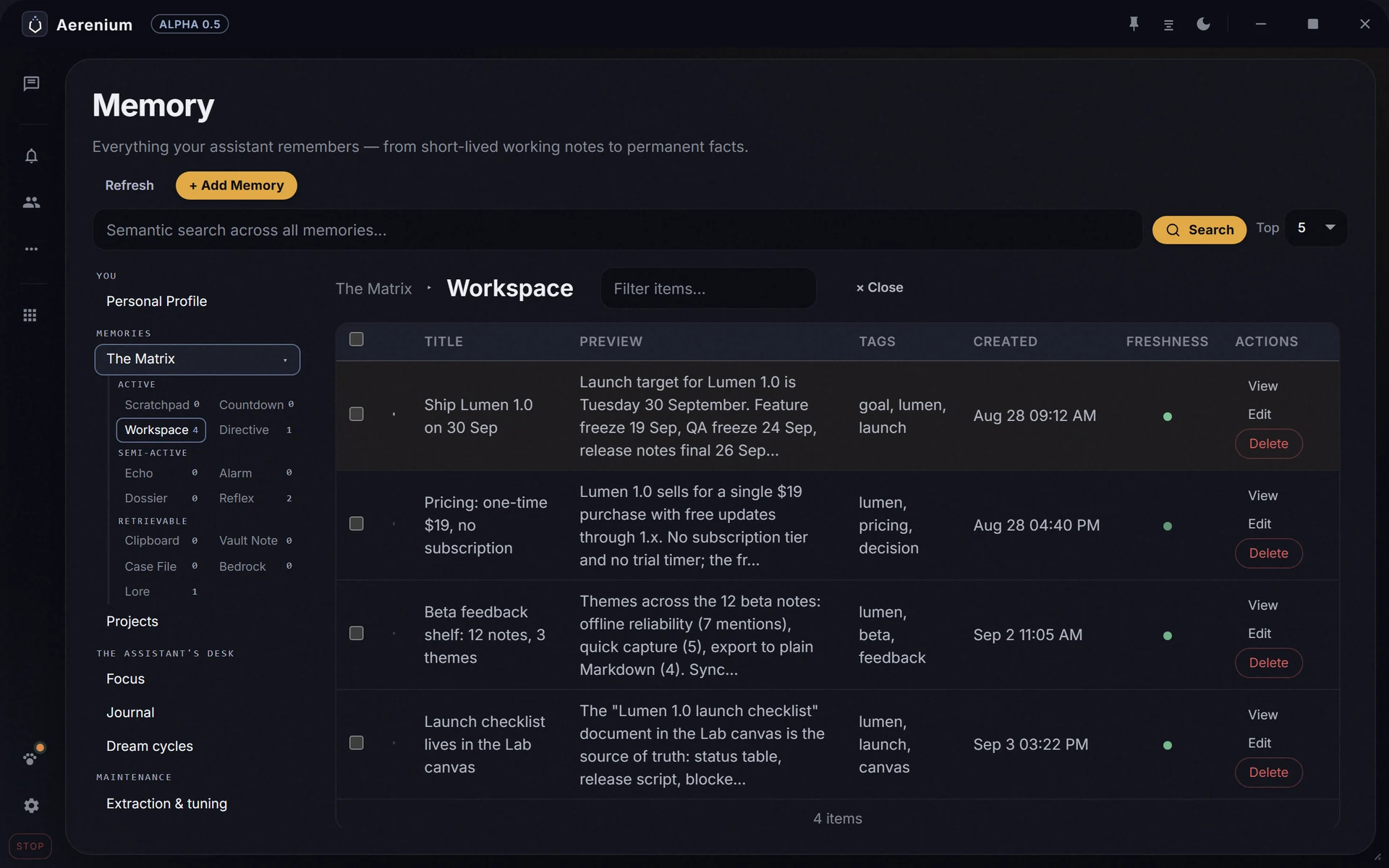
The memory matrix separates how long information should last from when it should surface. Useful items can consolidate into longer-lived memory; repeatedly ignored items can be demoted instead of following you forever.

Open memory to search, edit, promote, or demote saved context. Use a temporary conversation when you want a clean slate, and mount knowledge sources only when they belong in the room.

Aerenium Memory workspace with inspectable saved launch context
MemoryDurable context remains editable.
Aerenium Knowledge with searchable project shelves and a selected source result
KnowledgeChoose which sources belong in the room.

Agency with boundaries

Let it act without handing over everything.

Browser access, desktop control, command policy, and delegated-agent budgets stay separate. Choose the boundary that fits the task, keep approval gates where you want them, and stop the work when you need to.

A browser with its own hands

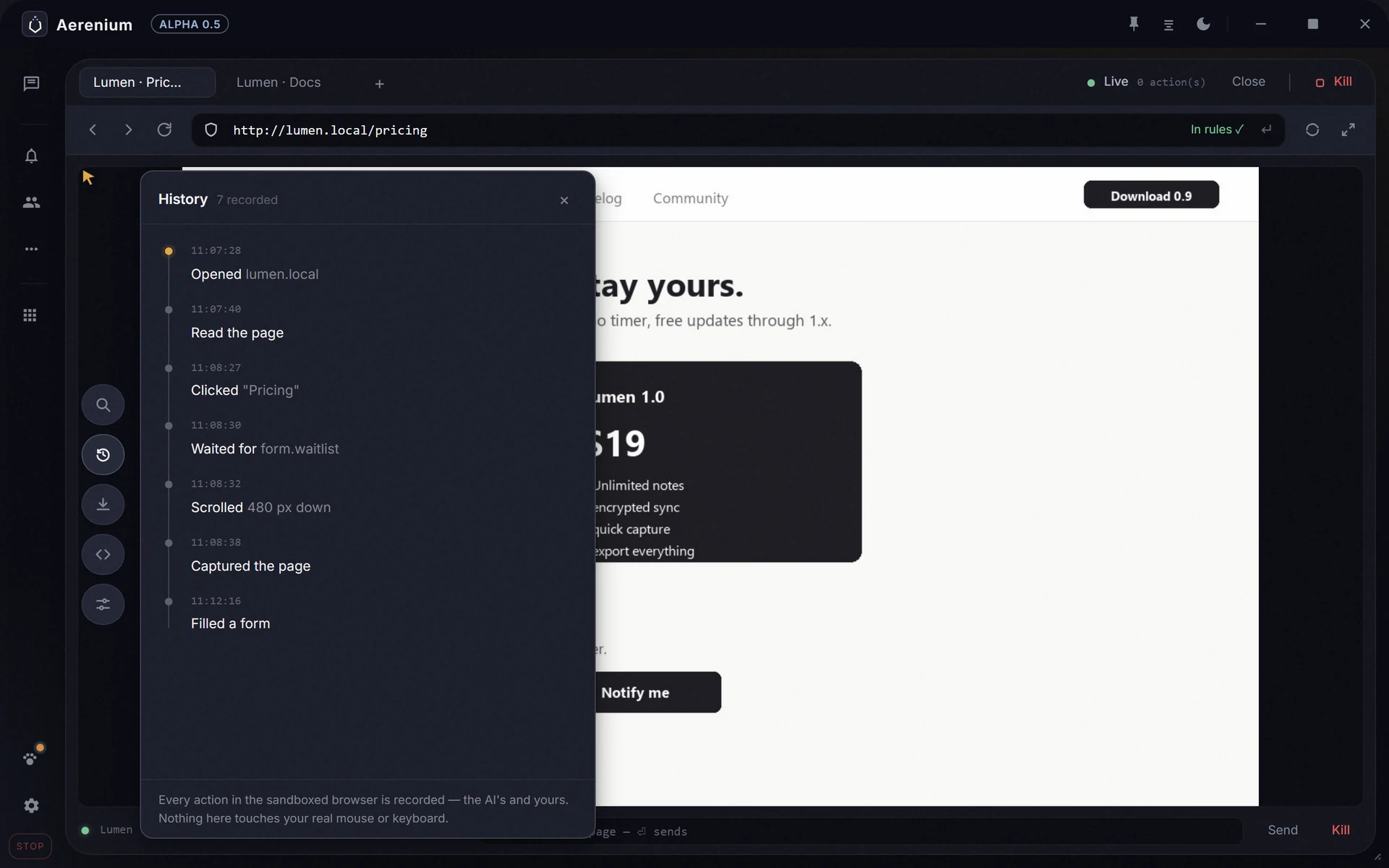
The in-app browser is sandboxed from your desktop. Its mouse, keyboard, downloads, access rules, and action history stay inside the browser workspace.

Desktop control stays off until invited

Set read and control permissions, scope allowed apps and domains, keep commands on Ask, and stop the agent when you need the keyboard back.

Budgets belong to you

Bring your own model key, set ceilings for delegated agents, separate specialist model pools, and inspect usage and cost trends inside the workspace.

Aerenium sandboxed browser with a visible recorded action history
Sandboxed browserThe action trail stays visible without taking over the desktop.

A complete workspace

One home for the whole loop.

Not a chatbot surrounded by novelty buttons. Each surface has a job, and each one can hand useful context or finished work to the next.

Think

Chat and Research

Work through an idea, search current sources, inspect what was read, and keep the conclusions attached to their evidence.

Remember

Memory and Knowledge

Carry decisions across sessions, search your own material, and choose the context that belongs in the room.

Make

Canvas and Code Lab

Turn chat output into durable documents, code, diagrams, and charts, then continue with files and source control.

Act

Browser and Automation

Run bounded browser work, schedule saved tasks, and let alarms notify you while tasks hand a directive back to the assistant.

Delegate

Swarm and Activity

Split complex work across specialists, watch the execution story, open the transcripts, and intervene without losing the main thread.

Extend

Skills, MCP, and Integrations

Teach repeatable workflows with readable skill folders, connect external tool servers, and bring conversations in through Discord.

Start with the full workspace

Free to use. Paid when you want more reach.

Use Aerenium with your own model keys for $0. Paid plans add managed proxy credits and connected extras such as voice. Desktop automation and specialist agents are part of the app. Credit packs remain optional.

Free The local workspace with your own model key. No card and no trial clock. $0
Plus Managed credits, voice, Discord, music, and a higher service ceiling. $15/mo
Pro More managed credits, higher rate limits, and cloud backup. $39/mo

The short version

Before you install.

Do I need a subscription to use Aerenium?

No. The Free tier runs the local workspace with your own model key, including computer actions and specialist agents. Paid plans add managed proxy credits and connected extras. You choose whether to use them.

Does it take over my computer?

No. The sandboxed browser and desktop Agent Mode are separate systems. Desktop read and control permissions are off until enabled, and app scope, domain scope, approval policy, and stop controls remain configurable.

Where does my workspace data go?

Conversation history, memory, and workspace data are local by default. Content you deliberately send to a model or integration follows the provider you chose. Cloud backup is an optional, separate feature.

Can I see what the assistant is doing?

Yes. Activity exposes planning, delegation, and tool calls as they happen. Swarm keeps delegated transcripts available to inspect and steer, while the system log keeps a chronological operational record.

Give it one real task.

Download Aerenium free, bring your own model key, and try the loop, controls, and memory on work that matters to you. Add a paid plan only when you need the connected layer.